Model Training Guide
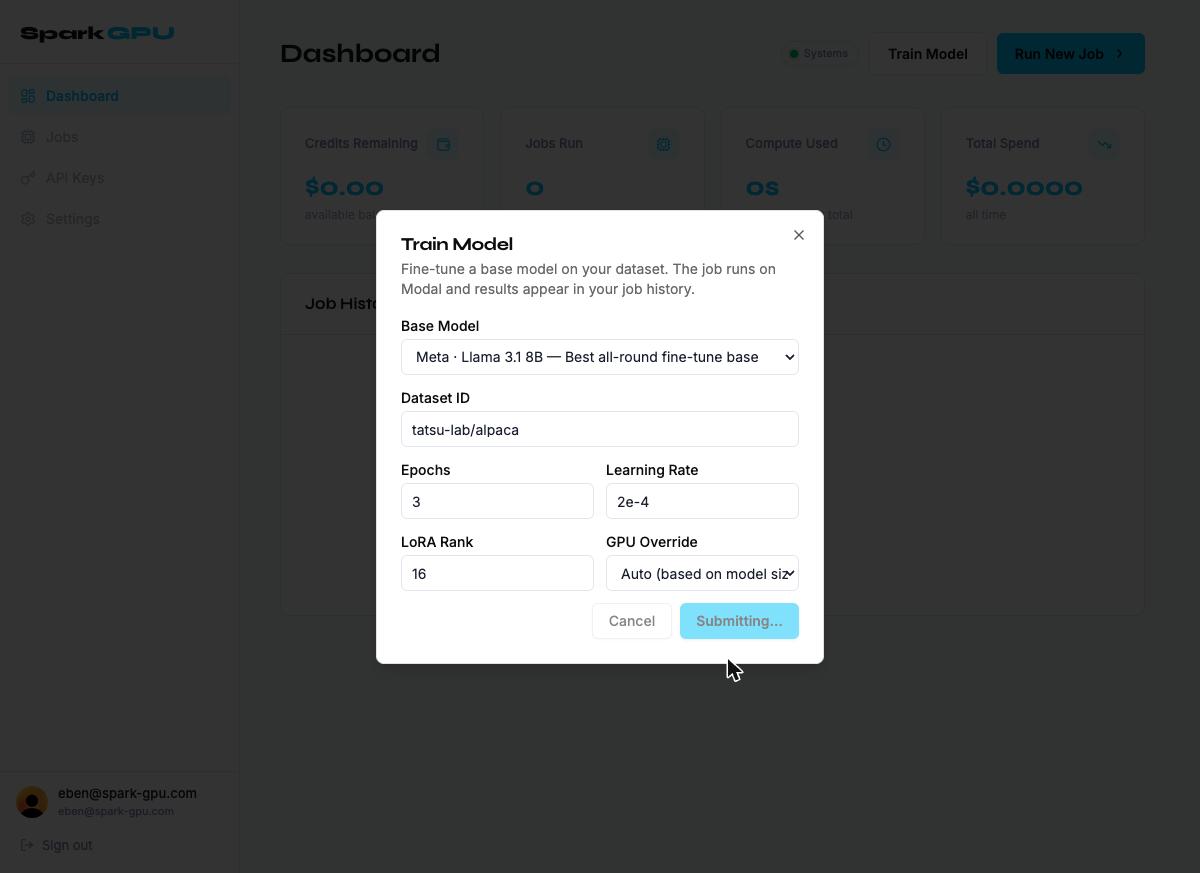
Train Model
The Train Model button opens a modal for submitting a fine-tuning job. This runs a LoRA fine-tune of a base model on a specified dataset using Modal GPU infrastructure. The trained checkpoint is returned as a signed download URL once the job completes.
Workflow
Workflow
- Open the Train Model modal.
- Select a Base Model, or choose "Custom HuggingFace model ID" and enter a model slug.
- Enter your Dataset ID — a HuggingFace dataset slug (e.g. tatsu-lab/alpaca) or an R2 object key for a private dataset.
- Set Epochs, Learning Rate, and LoRA Rank, or leave defaults.
- Optionally override the GPU tier. Auto is recommended unless you have a specific reason.
- Click Start Training →. The job is queued asynchronously and a job ID is returned immediately.
- Monitor status in Job History: queued → running → completed | failed.
- On completion, a signed checkpoint download URL (.safetensors or GGUF) appears in the job detail.
Note: Training jobs are billed by GPU-second. A cost estimate will be shown before the job starts (coming in a future release).
-- In depth model training guide coming soon --
-- In depth model training guide coming soon --